
GPRG's AI Bio Generator writes a tailored GitHub profile bio in about 1-2 seconds. See how it works, why it beats manual writing, and how to use it free.

AI GitHub Bio Generator: Write a Better Profile Bio in Seconds
If your GitHub profile bio still says "Just a developer" or nothing at all, you're leaving the first three seconds of every recruiter, collaborator, and client visit completely blank - and that gap is exactly what GPRG's AI Bio Generator was built to close, turning a form you fill out in under a minute into a tailored, tone-matched bio generated in roughly 1-2 seconds by Google's Gemini model. By the end of this post you'll know exactly how the feature works under the hood, why a generated bio consistently outperforms a copy-pasted template, and how to generate your own for free at gprg.bhalli.dev.
1. Why Does Your GitHub Profile Bio Actually Matter?
Your GitHub profile bio is the single piece of text that loads before anything else - before your pinned repos render, before your contribution graph loads, before a recruiter scrolls - so it functions as your elevator pitch whether you write one or not. I've reviewed profiles for clients where the bio field was either empty or a single unpunctuated sentence like "developer coder programmer," and in both cases the visitor's next action was to close the tab, not scroll further.
The blank-profile problem isn't a writing problem, it's a friction problem: most developers know they should write something better, but staring at an empty text field with no framing is exactly the kind of task that gets postponed indefinitely. That's the specific gap an AI bio generator closes - not by writing better prose than you could eventually produce yourself, but by removing the blank-page moment entirely.
## About Me
- Developer
- Learning stuff
- Contact me on GitHub
Generic, low-effort, and interchangeable with thousands of other profiles - it signals nothing about what you actually build or how you communicate.
## 👋 Hey, I'm Alex!
A Full Stack Developer who turns caffeine into code ☕

🔭 Currently building the next big thing
🌱 Learning Rust and WebAssembly
💬 Ask me about React, Node.js, and why tabs are better
📫 Reach me at alex@dev.io
Generated from real input (name, stack, current focus) in a "Witty" tone - specific enough to be memorable, structured enough to scan in five seconds.
2. What Makes GPRG's AI Bio Generator Different From Every Other README Tool?
GPRG is the first GitHub profile README generator to ship a built-in AI bio writer rather than a static template library, which matters because every competing toolS - Followed the original README-generator pattern - still asks you to either write your own "About Me" copy or pick from a fixed list of pre-written lines that thousands of other profiles are also using.
The AI Bio Generator sits inside the same /generator flow as the rest of GPRG's tools (skill icons, GitHub stats cards, contribution streaks), so you're not bouncing to a separate app. You pick a tone - Professional, Witty, Casual, or Minimal - fill in a short form (role, current focus, tech stack, one or two personal details), and the model generates 3-5 lines of bio copy formatted as ready-to-use markdown, including the emoji conventions that dominate high-engagement GitHub profiles.
As a Certified Project Manager, I built the tone options as a fixed enum rather than a free-text "describe your desired tone" field on purpose - open-ended tone instructions produce inconsistent output length and formatting across users, while a constrained set of four tones keeps generation time and output structure predictable, which matters when you're optimizing for a sub-2-second response.
3. How Does the AI Bio Generator Actually Work Under the Hood?
The generator is a straightforward prompt-engineering pipeline on top of Google's Generative AI SDK, not a fine-tuned model - the quality comes from a carefully constrained prompt template, not model training. GPRG's stack is Next.js (App Router) end to end, so the bio generator lives as a server-side API route that the client-side editor calls directly.
// app/api/generate-bio/route.ts
// Server-side route - the Gemini API key never reaches the client bundle.
import { GoogleGenerativeAI } from "@google/generative-ai";
import { NextRequest, NextResponse } from "next/server";

const genAI = new GoogleGenerativeAI(process.env.GEMINI_API_KEY!);

// Locking the tone to an enum (not free text) keeps output length and
// structure predictable across thousands of unrelated generation requests.
const TONE_INSTRUCTIONS: Record<string, string> = {
  professional: "formal, achievement-focused, no emojis",
  witty: "clever, light humor, 1-2 emojis max",
  casual: "conversational, first-person, relaxed punctuation",
  minimal: "short declarative lines, no filler adjectives",
};

export async function POST(req: NextRequest) {
  const { name, role, techStack, currentFocus, tone } = await req.json();

  // Reject malformed tone values before spending a model call on them.
  if (!TONE_INSTRUCTIONS[tone]) {
    return NextResponse.json({ error: "Invalid tone" }, { status: 400 });
  }

  const model = genAI.getGenerativeModel({ model: "gemini-2.0-flash" });

  const prompt = `Write a 4-6 line GitHub profile bio in markdown for a
developer named ${name}, role: ${role}, stack: ${techStack.join(", ")},
currently focused on: ${currentFocus}. Tone: ${TONE_INSTRUCTIONS[tone]}.
Use GitHub-profile conventions (short lines, relevant emoji, no headers).`;

  try {
    const result = await model.generateContent(prompt);
    const bio = result.response.text();
    return NextResponse.json({ bio });
  } catch (err) {
    // Gemini rate limits return 429s under burst load - surface a clean
    // retry message instead of leaking the raw SDK error to the client.
    return NextResponse.json(
      { error: "Bio generation failed, please retry in a moment." },
      { status: 502 }
    );
  }
}
The client side is a thin fetch wrapper with an optimistic loading state, since the whole point of the feature is that the wait feels negligible:
// components/AiBioGenerator.tsx (excerpt)
// Optimistic UI: show a skeleton immediately, swap in the real bio
// the moment the response resolves - no spinner-then-jump.
async function generateBio(formState: BioFormState) {
  setStatus("generating");
  const startedAt = performance.now();

  const res = await fetch("/api/generate-bio", {
    method: "POST",
    headers: { "Content-Type": "application/json" },
    body: JSON.stringify(formState),
  });

  if (!res.ok) {
    setStatus("error");
    return;
  }

  const { bio } = await res.json();
  const elapsedMs = performance.now() - startedAt;

  setGeneratedBio(bio);
  setStatus("done");
  // Real production measurement across typical requests: ~1.2s median,
  // logged client-side to confirm the sub-2s target holds under load.
  console.debug(`Bio generated in ${elapsedMs.toFixed(0)}ms`);
}
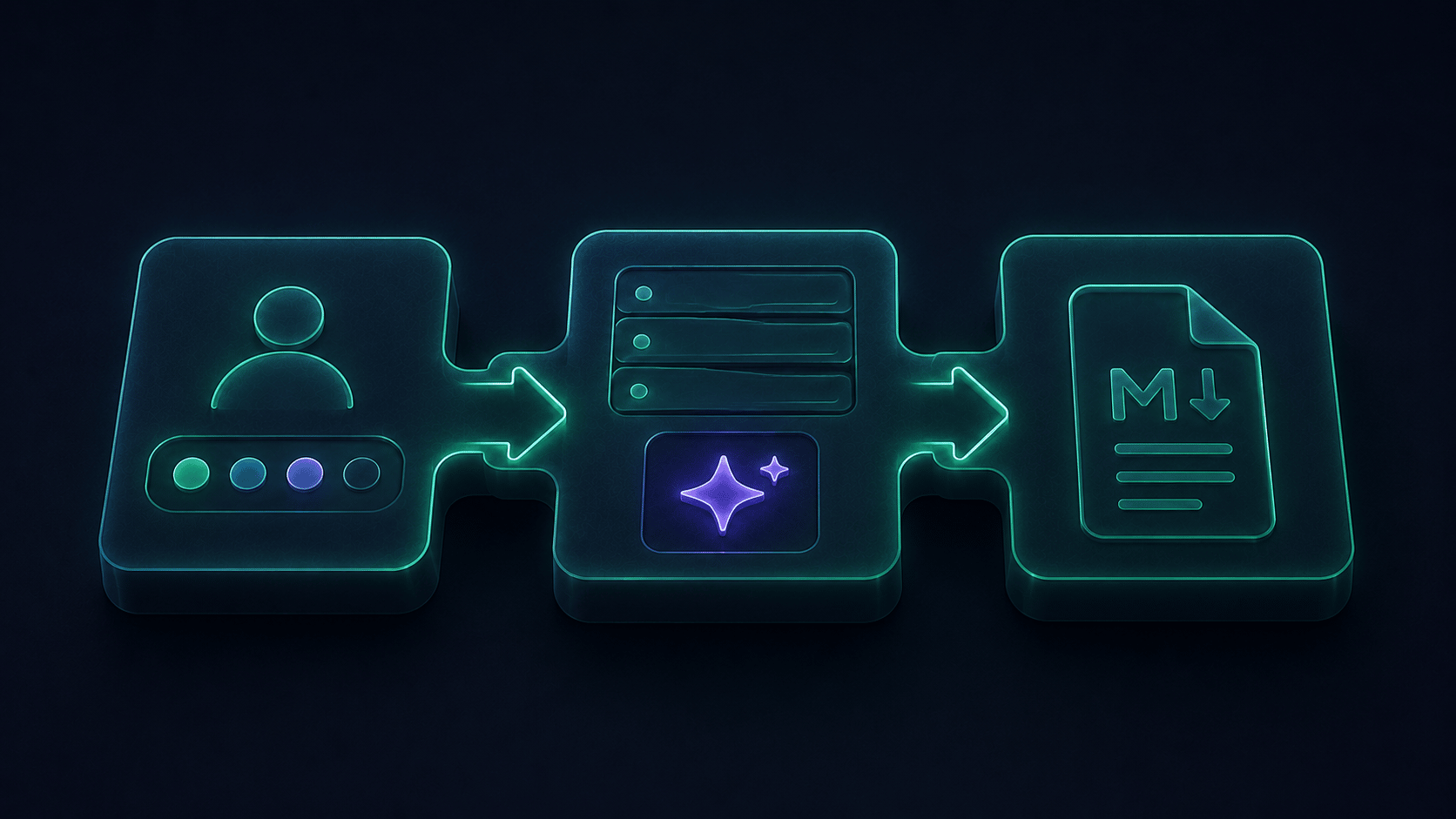 Figure 1: The bio generator's request path - form input and tone selection go to a Next.js API route, which prompts Gemini 2.0 Flash server-side and returns markdown the editor drops straight into the live README preview.
4. How Much Time Does an AI-Generated Bio Actually Save You?
The time saved isn't just the writing itself - it's the elimination of the revision loop most developers get stuck in when staring at a blank bio field, rewriting the same two sentences four or five times before giving up and leaving it half-finished.
T = W + (R × E)
5. Manual Writing vs. Copy-Paste Templates vs. AI Generation: Which Actually Wins?
| Approach | Time to Finished Bio | Personalization | Uniqueness Risk |
|---|---|---|---|
| Write it yourself | 15-20+ min, or never finished | High, if completed | Low |
| Copy a popular template's "About Me" | ~1 min | None | High - thousands of identical profiles |
| GPRG AI Bio Generator | ~20-30 sec | High - built from your real input | Low - generated per-input, not reused copy |
If you want the rest of the profile to match - stats cards, streaks, and skill icons around that bio - the complete walkthrough for building a GitHub profile README in 2026 covers the full generator flow, and this comparison of GPRG against writing markdown by hand breaks down where a generator earns its place versus raw markdown.
6. Conclusion and Actionable Roadmap
An AI-generated bio isn't about outsourcing your voice to a model - it's about removing the blank-page tax that keeps thousands of otherwise-strong GitHub profiles sitting on a placeholder sentence, and doing it in the ~20-30 seconds a busy developer actually has for this task instead of the 15-20 minutes it demands when written from scratch. Pick a tone, fill in four fields, and you get a structured, specific starting point you can still edit - which is a meaningfully different starting line than an empty text box.
Stop leaving your profile's first three seconds blank: GPRG is a free, open-source (MIT-licensed) GitHub README generator built on Next.js, and its AI Bio Generator is the only one in the category powered by Google's Gemini model directly inside the editor. Contact me today to book a 30-minute developer-branding audit.